





Yandex Direct pay-per-conversion is paying for things that are not leads: 7 goal mistakes and how to find them in half an hour
Pay-per-conversion in Yandex Direct sounds like a guarantee: clicks are free, you only pay for results. In reality Direct pays for whatever you called a result. If a goal is set up wrong, you honestly pay for button clicks, chat questions and your own test visits. Below are seven mistakes we found on our own website and in client projects over the last two months. Almost all of them can be fixed without a developer or with an hour of their time.
How to tell there is a problem in five minutes
Open the campaign report in Direct for the last two weeks and write down the number of paid conversions. Next to it, put the number of real leads for the same period: from the CRM, email, phone, messengers - anywhere, but counted by hand.
If the numbers match, you can stop reading. If Direct counted 12 conversions and the sales manager remembers four conversations, the money is going somewhere else, and that somewhere is in the list below.

Mistake 1. The paid goal is a click, not a lead
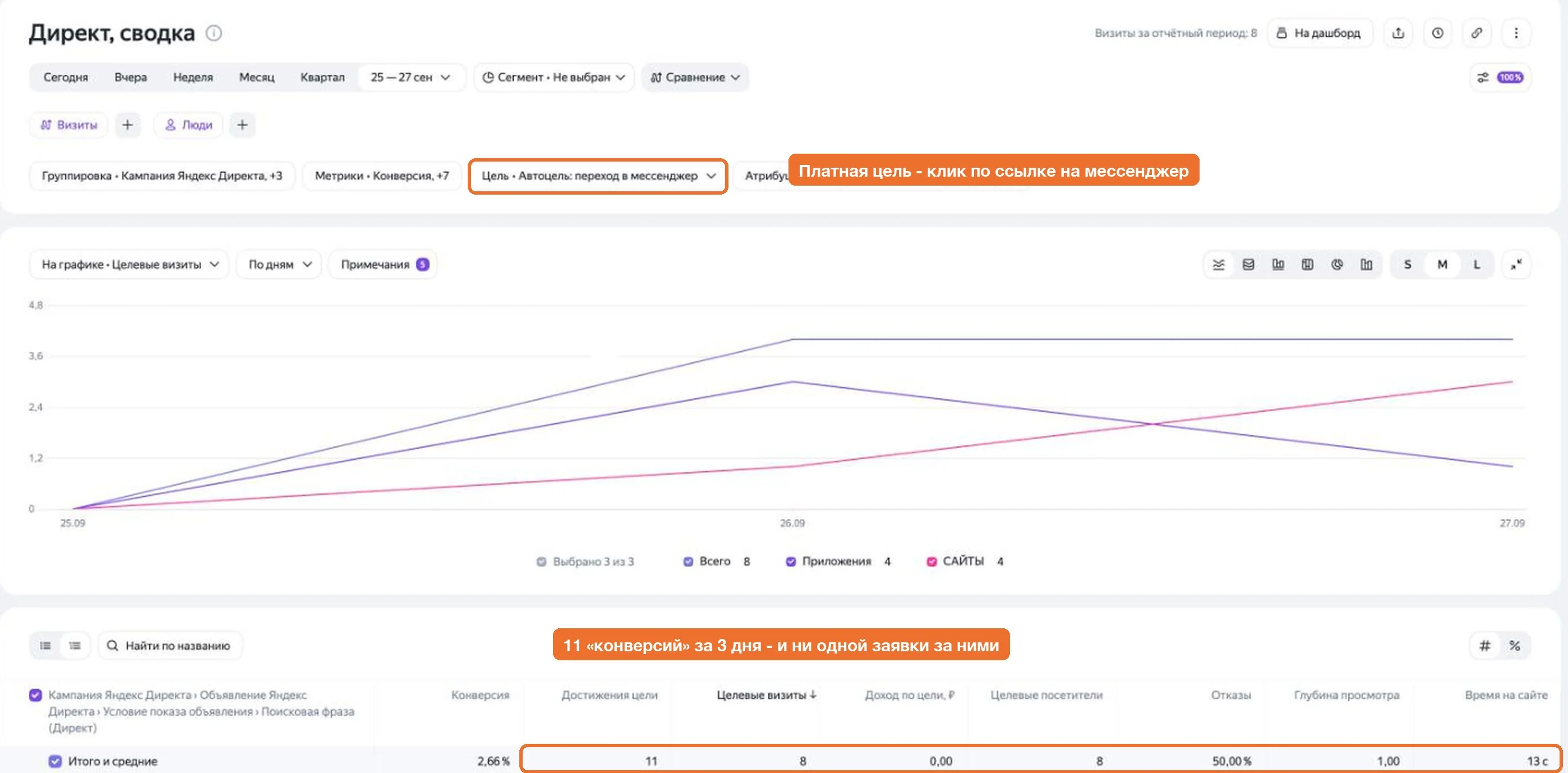
The most expensive and the most common one. A “Message us on Telegram” button links to t.me, and Metrica counts a “messenger visit” the moment it is clicked. The person may close the messenger without writing anything, but Direct has already charged for a conversion.
That is exactly what happened to us: over three days at the end of September all six paid conversions turned out to be messenger clicks. Not a single lead behind them. Worse, the strategy learned from those clicks and went looking for people who like pressing buttons.
The right way: a paid goal is only an action after which you have a contact. A submitted form, a phone number left in the chat, a call. Lead buttons open a form, not a messenger. A messenger click can stay a Metrica goal to watch interest, but it should not be added to the campaign.
Mistake 2. The counter is not on every page
Sounds unbelievable, but we found it on our own site: the Metrica counter was on the two home pages, and on the other 225 - services, case studies, blog - it had never been there. The template that built inner pages simply did not include it. Ads led to a service page, and leads from there never reached Metrica or the strategy.
In this situation Direct sees ad traffic without conversions and decides the audience is bad.
How to check: open five or six pages from different sections, especially the ones ads lead to, and look in the developer tools (Network tab) whether tag.js loads. Searching the code for the word “metrika” is not enough: it may be in a comment or in an old disabled block.
Mistake 3. Auto goals count things that are not leads
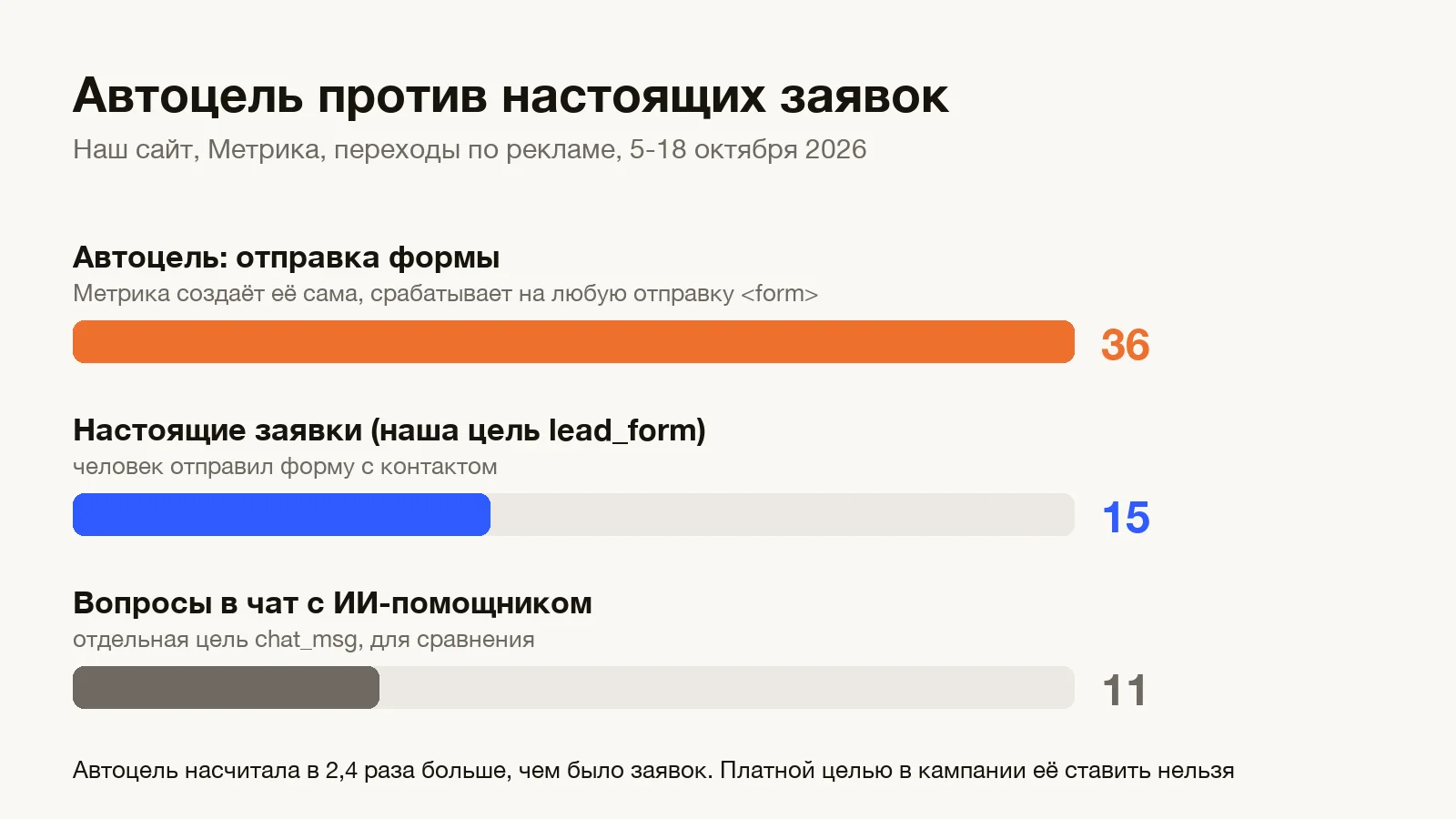
Metrica creates goals on its own, like “Auto goal: form submission”. Handy while you have one form on the site. We added a chat with an AI assistant, and the question input was built with a form tag. Metrica counted every visitor question as a form submission. I looked at the report and thought we were losing leads. There were no leads - just questions.
If such an auto goal is a paid goal in the campaign, you pay for every site search, newsletter signup and chat question.
The right way: only your own goals on specific events go into the campaign (“lead submitted”, “contact left in chat”); keep auto goals for observation. Fields that do not send contacts (search, chat, filters) are better built without a form tag.
Mistake 4. You pay for your own checks
The marketer checks the ad link, the developer checks the form after a fix, the owner checks how the site looks on a phone. If ad tags stay in the address, those visits show up in reports as ad visits. And a test lead also shows up as a conversion.
Test visits with tags gave us about 11% of “ad leads” in a week. The “Don't count my visits” filter did not catch them because we checked from different devices and networks.
The right way: check the site with a clean address, without utm and yclid. If a tag is needed for a test, use one agreed tag (for example utm_source=check) and exclude it with a segment in reports. Mark test leads with the word “test” in the name and remember them when reconciling.
Mistake 5. One lead is paid for twice
This happens when, besides the website goal, you send offline conversions from the CRM to Direct: “reached”, “meeting”, “deal”. The person submitted a form - the goal counted. The manager reached them - an offline goal counted again for the same client. The strategy sees two conversions where there was one person, and you pay for them twice.
The right way: one payment per client. If a paid website goal has already fired for a lead, do not send an offline goal for the same person to ads. Offline goals are useful for channels without a website goal: calls, messenger chats, email. We described how we link calls and deals to ads in the article about our studio's own CRM.
Mistake 6. Junk leads are paid for like real ones
The form is submitted, there is a contact, the goal counted fairly. Except it is a school kid who needs a site “for a school project”, or a bot. With pay-per-conversion every such lead costs as much as a real one and also teaches the strategy to look for more of the same.
Where our junk came from:
- auto targeting: over three days 129 of 165 search phrases were its picks, including “android studio” and “create a logo online”;
- the ad network: 157 visits from mobile games and not a single lead;
- school kids: leads at night, names in lower case, “for myself”.
The right way: turn off the extras in auto targeting's “Alternative queries”, block gaming placements in the ad network, and keep the age bid adjustments even if Direct's auto audit suggests removing them. On the site, send suspicious leads (night time, junk in fields, filled too fast) as a separate goal that is not in the campaign. The lead is not lost - the manager sees it - but Direct does not pay for it or learn from it.

Mistake 7. Fixing everything in one day
Once you find the mistakes, you want to fix everything at once: goals, goal prices, budget, bids, landing pages. Each of these changes resets the strategy's learning. Direct needs about 10 conversions a week to learn, and after a goal change it starts collecting them again.
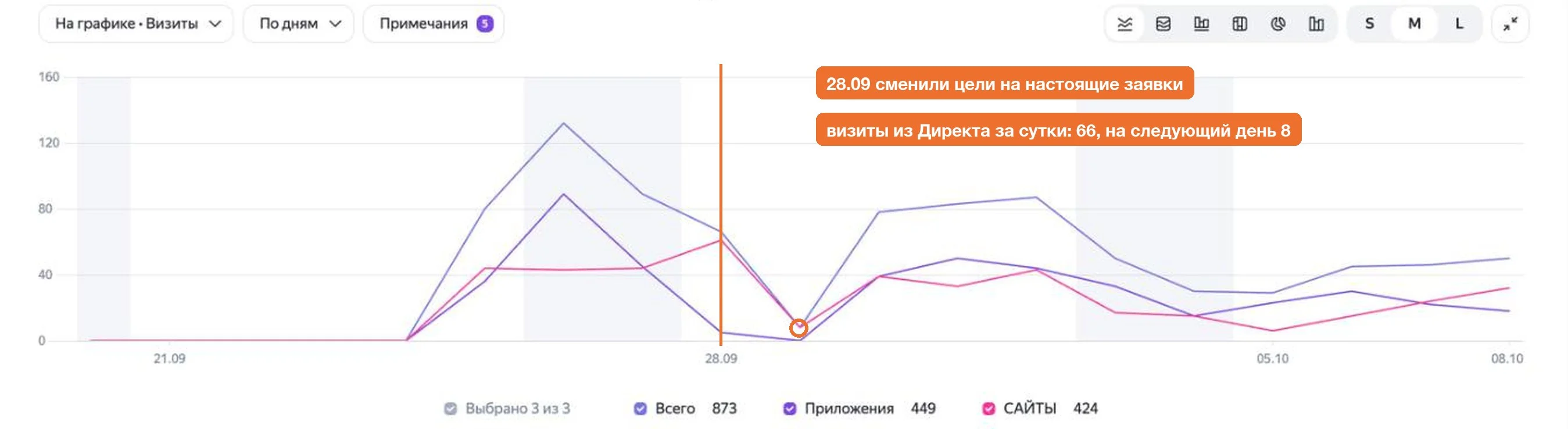
When we replaced “messenger clicks” with real leads, visits from Direct dropped from 66 to 8 within a day. That is the normal price of relearning, but you need to be ready for it instead of panicking and changing more settings.
The right way: fix the goals in one go, write down the date and then leave the learning-sensitive settings alone for 7-10 days. Images, site copy and negative keywords in moderation can be changed.
The opposite problem: there is a lead, but the goal did not fire
It also happens the other way round: a person filled in the form, but the lead did not arrive and neither did the goal. The strategy gets fewer conversions and cuts impressions. How to look for it: build a Metrica segment “submitted a form or contact details, but no lead goal” for a month and watch those visits in Webvisor.
That is how we found two real losses. In the first, the browser autofill put data into a hidden honeypot field for bots, and the site took a person for a bot. In the second, a client on an iPhone did not tick the consent box, and the error message was hidden under the keyboard.
A half-hour checklist
Go through it before raising the budget or changing the strategy:
- paid conversions in Direct over two weeks match real leads over the same period;
- the campaign has only goals on actions with a contact: form, chat contact, call - no messenger clicks or auto goals;
- the counter loads on every page ads lead to, checked in the Network tab rather than by searching the code;
- your own checks happen without ad tags or with one tag excluded in reports;
- offline conversions do not duplicate the website goal for the same client;
- auto targeting is trimmed, gaming placements are blocked, suspicious leads go to a separate unpaid goal;
- after the fix the date is written down, and nobody touches learning-sensitive settings for a week;
- once a month you check the “form submitted, no goal” segment in Webvisor.
If this is already on your plate, here is how we do it end to end: Yandex Direct ads setup and management.
Frequently asked
Why does Yandex Direct with pay-per-conversion spend money but bring no leads?+
Most often the paid goal fires on something that is not a lead: a messenger button click, the “form submission” auto goal on search or chat, test visits with ad tags. Compare paid conversions with real leads over two weeks.
Which goals should go into a Yandex Direct campaign?+
Only actions after which you have the person's contact: a submitted form, a contact in chat, a call. Keep messenger clicks, scrolling and form opens as Metrica goals for observation.
How long should you wait after changing goals in Yandex Direct?+
The strategy needs about 10 conversions a week to learn. After a goal change learning starts over: plan 7-10 days without changing bids, budget, goals or landing pages.